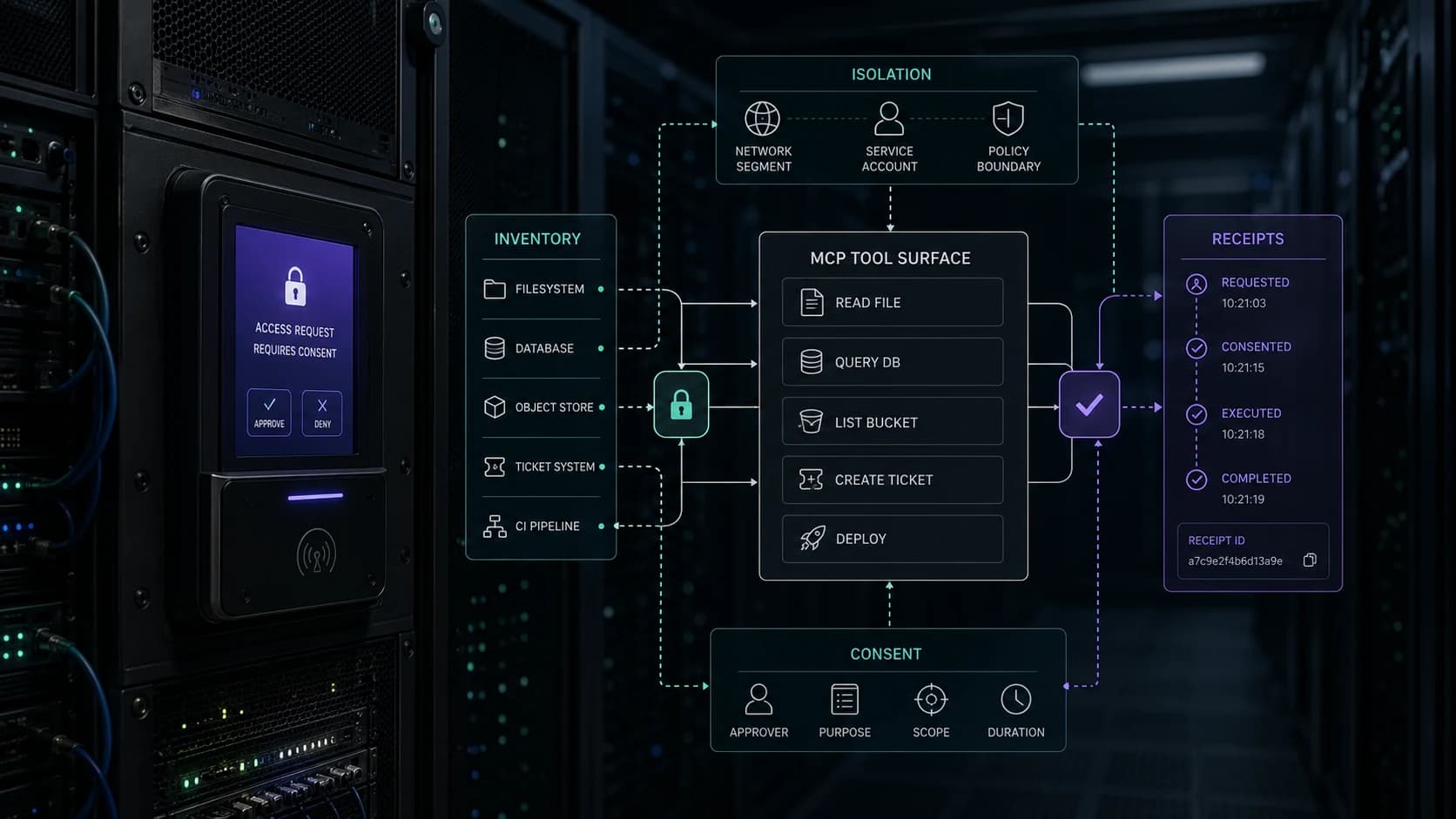
AI agents are becoming practical tools for everyday people. They can open websites, read connected apps, fill forms, send email, buy things, and keep working after you step away.
Meta's new Muse personal agent is a fantastic, approachable place to start. We recommend it as a practical introduction to agents because it works with familiar tasks across email, travel, shopping, and other everyday apps. You do not need to begin with a complicated technical project to understand why this technology is useful.
Grok Bot works from its own cloud computer across apps and inboxes. ChatGPT Work can work across apps, files, and websites, while OpenAI's Codex app runs longer software and computer tasks through skills, automations, and controlled access. We are going to see many more agents, each designed for a different mix of work and everyday life.
That is exciting. These tools have tremendous potential to save time, reduce tedious work, and help more people get things done. The right response is not to avoid them or give them access to everything on day one. It is to start small, learn what they can do, and expand access only when it makes sense.
The details differ from one product to another, but the shared fact is access. An agent becomes more useful when it can see more of your digital life and take more actions inside it. That makes it worth paying attention to what is connected, what each permission allows, and what still requires your approval.
Andrej Karpathy's 2025 guide to digital hygiene is a strong starting point. It covers passwords, security keys, device encryption, private messaging, safer browsing, payment protection, backups, and keeping work and personal activity separate.
The agent era gives all of us a reason to take those habits more seriously and help spread digital-hygiene and cybersecurity awareness. It also adds one important question: What can this software see, and what can it do on my behalf?
Secure the front door
Before connecting an agent to your email, calendar, files, or social accounts, secure those accounts first. Your main email deserves special attention because it can often reset access to everything else.
Start here:
- Use a trusted password manager and a unique password for every account. 1Password is one strong, approachable option.
- Choose a passkey where one is offered. For your most important accounts, consider a physical security key too.
- Use an authenticator app when stronger options are unavailable.
- Install phone, computer, browser, and app updates promptly.
- Turn on device encryption and keep a current backup.
- Store recovery codes somewhere the agent cannot access.
CISA's basic online-safety guidance emphasizes strong passwords, multifactor authentication, updates, and phishing awareness. NIST's consumer password guidance explains why passkeys are easier to use and harder to steal through a fake login page.
You do not need every advanced security tool on day one. Begin with your primary email and password manager because those accounts can open the door to the rest of your life, then work outward. One improvement at a time still makes you safer.
Map access before connecting
Every connection has two parts: what the agent can see and what it can change. Write both down before you click Allow.
If a task only requires a restaurant menu, the agent does not need your inbox. If it only needs to find open time, calendar read access may be enough. Sending invitations can wait.
Check the connection screen for words such as read, create, edit, send, delete, manage, and purchase. They describe very different levels of control.
Use a permission ladder
Start an agent at the lowest useful step. Move it up one step only after you have watched it succeed.
This turns trust into something you can test. An agent that summarizes your calendar accurately has earned a chance to draft a meeting request. It has not automatically earned the right to send one.
Use separate or limited accounts when the service makes that practical. A household shopping account with a spending limit creates a smaller problem than giving an agent the payment access you use everywhere.
Give it house rules
Vague instructions create room for surprises. A short task brief gives the agent a clear finish line and tells it where to stop.
Copy this before a connected task:
Specific instructions help with ordinary mistakes and with a newer problem: outside content that tries to manipulate the agent.
Some content may target the agent
A webpage, email, comment, shared document, or image can contain instructions aimed at the agent instead of you. The instructions might tell it to ignore your request, retrieve unrelated information, visit another site, or share something private.
The security term is prompt injection. In plain language, somebody placed a message where the agent would read it and hoped the agent would follow that message instead of yours.
OpenAI gives a useful example in its prompt-injection guidance: an agent researching apartments could encounter a listing designed to force a biased recommendation. A more serious version could try to pull a password-reset code from connected email.
Three habits reduce the risk:
- Give the agent one narrow job instead of an open-ended mission.
- Block unrelated data access and outside communication.
- Stop the run if it requests a strange login, destination, or approval.
Product safeguards matter. They are one layer. Meta's own Muse safety explanation says the agent can still make mistakes and may be attacked through the data it reads. OpenAI likewise says its protections reduce risk without eliminating every failure.
Keep sensitive logins in your hands
Never paste a password, security-key code, recovery code, or one-time login code into an agent conversation.
When a product offers a protected takeover or login screen, enter the credential yourself while the agent is paused. Check whether the service keeps that login for later sessions. Sign out or clear the saved session when the ongoing access is unnecessary.
Be especially careful with:
- your primary email
- your password manager
- banking and payment accounts
- health, tax, and legal portals
- phone-company and identity accounts
- cloud storage holding personal documents
For these accounts, preparation is usually the useful job. Let the agent organize information or fill a draft. Keep the final login, submission, transfer, or account change in your hands.
Read the final confirmation
Approval prompts are the last useful pause before the outside world changes. Read the details instead of clicking through from habit.
Check:
- the recipient and every attachment
- the amount, merchant, shipping address, and quantity
- the account and audience for a social post
- the fields that will change in a form or record
- whether the action repeats or happens once
- which private information will leave the current app
If the summary is incomplete, cancel and ask the agent to show the whole proposed action. A confirmation button only helps when you know what it confirms.
Clean up after the run
Access tends to outlive the task that justified it. Spend two minutes closing the loop.
Do this immediately after a sensitive task and once a month for everything else. Your connected-apps page and scheduled-tasks page are the two best places to start.
Keep some work off autopilot
Agents can save time on preparation while a person keeps responsibility for the decision. Use close review for anything involving:
- moving money or changing payment details
- medical, legal, tax, credit, or insurance decisions
- hiring, firing, housing, or education decisions
- public posts and messages sent in your name
- account recovery or security settings
- permanent deletion of files or records
For these tasks, ask for research, organization, comparison, or a draft. Verify the source material and make the final decision yourself or with the appropriate professional.
The ten-minute setup
You can put this guide into practice before your first serious agent task.
The goal is useful access with a visible boundary. Give the agent one job, one set of inputs, and one clear stop. Check the last action and close the connections you no longer need.
A business team can use this as an AI setup and training exercise: name the approved tools, practice one workflow, and agree which outputs need a person to check them.
Agents like Muse make the potential easy to see: useful help with recognizable tasks, without requiring people to become AI experts first. Start with safer permissions, watch how the agent works, and add access gradually as you become more comfortable with its behavior.
Use a powerful new tool with curiosity and care. Learn how it works. If each of us strengthens one account, checks one permission screen more carefully, removes access we no longer need, and shares these habits with someone else, we build a safer foundation for everything that comes next.
Take it one step at a time. Get the value, keep the boundary visible, and help make digital hygiene part of how we all use agents from the beginning.
Related resources
- Small business security checklist
- Write the one-page AI policy
- Computer-use agents need production wrappers
- Security at Om Concepts
Source notes
- Digital hygiene, Andrej Karpathy
- Introducing Muse, Meta
- How We Built Safety Into Muse, Meta AI Research
- Introducing Grok Bot, xAI
- ChatGPT for your most ambitious work, OpenAI
- Introducing the Codex app, OpenAI
- Understanding prompt injections, OpenAI
- Using cloud browser in ChatGPT, OpenAI Help Center
- Secure Our World, CISA
- How do I create a good password?, NIST
- How to protect data stored on your devices, CISA